Managing Case Types & Document Types
Case types and document types define the structure of what can be filed in your court. Getting these right ensures filers see the correct options and clerks can efficiently categorize incoming filings.
Case Types
What Are Case Types?
Case types represent the categories of cases your court handles — Civil, Family, Criminal, Juvenile, Probate, and so on. When a filer starts a new case, they must select a case type, which determines:
- What document types are available for upload
- What fees apply to the filing
- How the filing may be routed to clerk queues
Managing Case Types
Navigate to Case Types in the Admin Panel. The page displays a tree view organized by court.
To add a case type:
- Select your court in the tree
- Click Add Case Type
- Enter the Name (e.g., "Family") and Code (e.g., "FA")
To add a sub-type:
- Click on an existing case type in the tree
- Click Add Sub-Type
- Enter the Name (e.g., "Divorce") and Code (e.g., "DIV")
To edit or remove: Click on any case type or sub-type to edit its details. Be cautious when removing case types that have existing filings — those filings will retain their original case type.

Common Case Type Structures
| Case Type | Typical Sub-Types |
|---|---|
| Civil | General, Contract, Personal Injury, Property |
| Family | Divorce, Custody, Adoption, Child Support, Protection |
| Criminal | Felony, Misdemeanor |
| Juvenile | Delinquency, Dependency |
| Probate | Succession, Interdiction, Tutorship |
Document Types
What Are Document Types?
Document types categorize the PDFs that filers upload. When a filer attaches a document in the filing wizard, they select a document type from a list. This tells the clerk what kind of document they're reviewing.
Managing Document Types
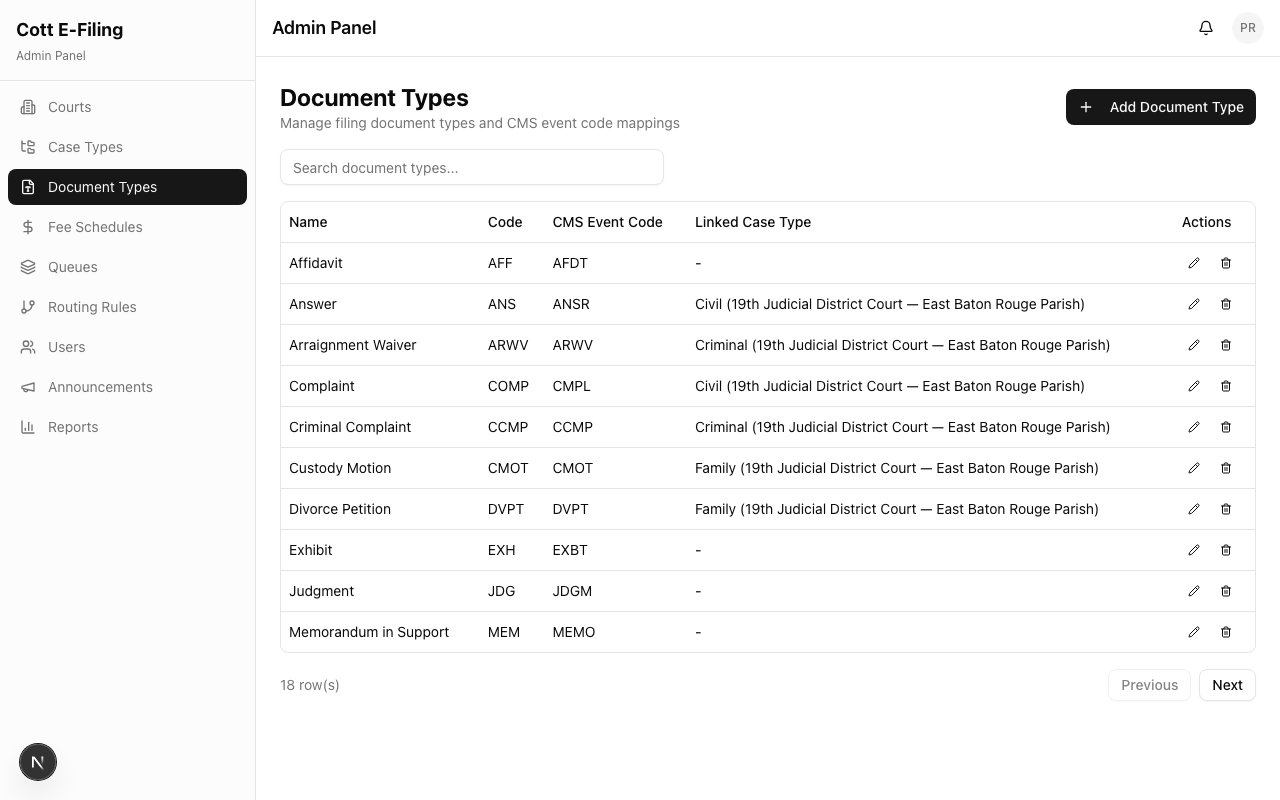
Navigate to Document Types in the Admin Panel.
To add a document type:
- Click Add Document Type
- Enter the Name (e.g., "Petition", "Motion to Compel", "Affidavit")
- Select which case types this document type applies to
To edit or remove: Click on any document type to update its name or associated case types.
Common Document Types
| Document Type | Typical Use |
|---|---|
| Petition | Initial filing to open a case |
| Answer | Defendant's response to a petition |
| Motion | Request for the court to take action |
| Brief / Memorandum | Legal argument in support of a motion |
| Affidavit | Sworn statement of facts |
| Exhibit | Evidence or attachment referenced in another document |
| Subpoena | Order requiring a witness to appear or produce documents |
| Order | Court-issued directive |
| Judgment | Final court decision |
| Notice | Formal notification to parties |
| Stipulation | Agreement between parties |
Tip: The more specific your document types, the easier it is for clerks to review filings quickly. "Motion to Compel Discovery" is more useful than just "Motion."